Inspect shape, detail and wireframe
Low Poly 3D Model Generator: Explore the shape with fewer faces to inspect
Start with a clear image of one object. Check the shape and wireframe from several angles, then export the mesh to refine it or test it in your scene.
Create your model
3D preview
Sample result · Rodin 2.5 Fast
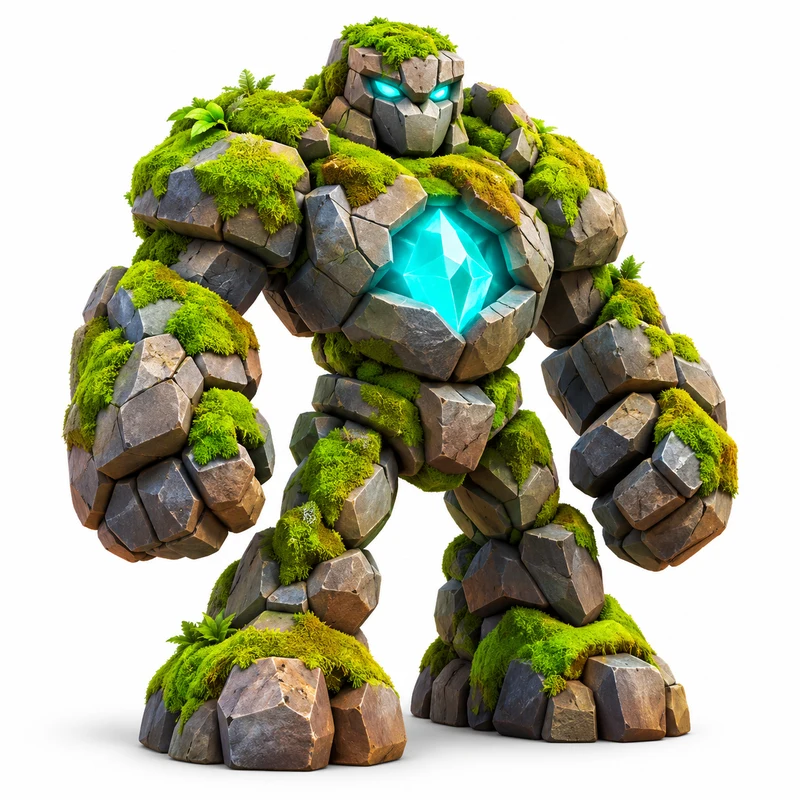 Input image
A real Rodin 2.5 Fast example generated on Image to 3D AI. Inspect the shape, then create your own model from a supported input.
Use cases
Low poly 3D model generator ideas with a clear silhouette
Use the low poly 3D model generator for shape exploration where a simpler mesh is useful. Inspect the actual result against your project’s geometry, material and delivery requirements.
- Rodin 2.5 Fast
Use the low poly 3D model generator to explore the broad form of a prop before preparing a production asset. Check whether the silhouette survives with less geometry, then review the actual face count. UVs, collision geometry, texture size and other engine requirements still belong to your own optimization process.
- TRELLIS
Use the low poly 3D model generator to explore an object for a compatible web viewer, then review more than its face count. Check texture dimensions, download size and browser rendering cost in your own integration. The mesh is an editing starting point; this workspace does not publish webpages or automatically verify a loading budget.
- TRELLIS
Use the low poly 3D model generator examples to inspect recognizable forms with a smaller geometry budget. Compare the main outline and small details in each measured result. A low detail setting is a request, while the actual file and its intended use determine whether that amount of geometry is appropriate.
- TRELLIS
Explore a recognizable object with a small number of visual parts, then inspect the mesh from the angles your scene needs. A simpler geometry draft can help you make an early creative decision. Final topology, materials and deformation requirements still depend on the production work you intend to do.
Examples
Low poly 3D model generator samples with measured face counts
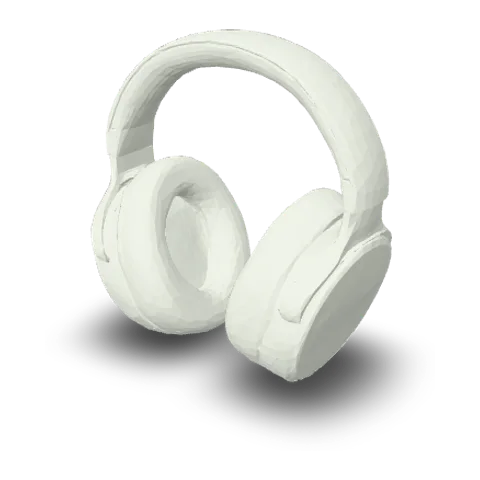
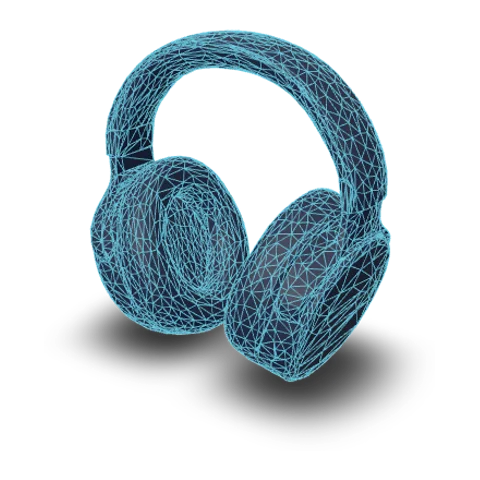
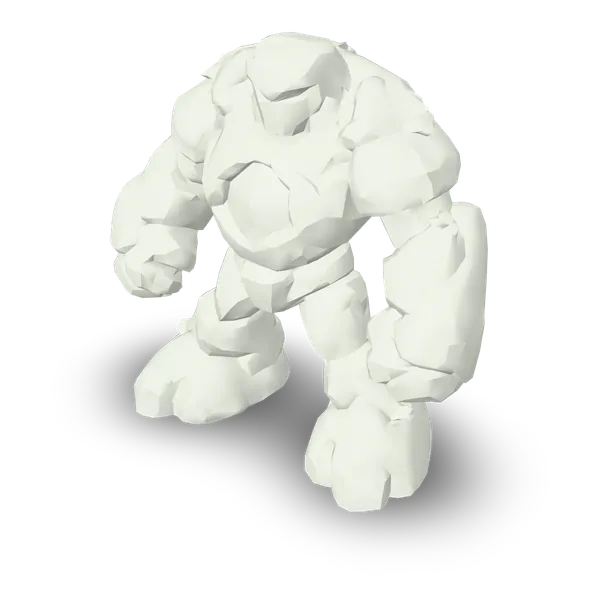
Inspect the stone golem, headphones, penguin and camera as separate low-detail examples. The golem contains 3,990 faces and the headphones 6,374. These are measurements of individual files, not a promise that the next generation will have the same count.
Input imageFeatures
Use the low poly 3D model generator to judge geometry deliberately
A low poly 3D model generator is useful when the resulting shape can be checked, not just labeled low. Separate the requested setting, the measured file and the needs of your next tool.
Keep the main form recognizable
Give the low poly 3D model generator a subject with a clear outline and visible main parts. A lower-detail mesh has fewer opportunities to describe small grooves, thin appendages or complex surfaces. Turn the result and decide whether the larger shapes still communicate the object before investing time in further editing or materials.
 Input image

Check the silhouette around a lower-detail mesh
Use the low poly 3D model generator result views to inspect where a smaller geometry budget changes the shape. Compare the generated front, side and back rather than judging only the cover image. Check whether the major outline, openings and connections remain useful for your project. These angles show one measured output; they do not establish the face count or visual quality of every future generation.



Compare measured faces with visible shape
The headphones shown in this row contain 6,374 faces. Use their solid and wireframe views to inspect the actual geometry separately from the surface texture. Elsewhere, the stone golem in the Hero and examples contains 3,990 faces after a Rodin Fast 4K Triangle request. These are separate measured files; the low poly 3D model generator does not guarantee an exact count or the same reduction for every object.

Plan the cleanup after the download
Choose GLB or OBJ to continue working on a mesh in compatible software, or STL when preparing a shape for a separate printing workflow. A lower face count does not automatically provide clean deformation loops, optimized UVs, collision meshes or smaller textures. Inspect those properties against your project’s requirements and make any remaining changes in an editor.
- glbWeb and games
- objEditing tools
- stl3D printing
How it works
How to use a low poly 3D model generator and inspect the result
Prepare a reference, review the detail setting and examine the actual mesh. The low poly 3D model generator provides a starting result for your own geometry decisions.
- Add a clear reference

Start with a clear subject
Upload a picture to the low poly 3D model generator with the main outline and important parts visible. You can also choose another supported input tab. Keep the subject focused so the model has a clear form to interpret before applying the selected detail setting.
- TRELLISFREE
- Rodin 2.5 FastPRO
- Hunyuan 3D 3.1 RapidPRO
- Tripo H3.1PRO
- Hunyuan 3D 3.1 ProPRO
- Rodin 2.5PRO
- Meshy 7.1PRO
Review the lower-detail option and quote
The low poly 3D model generator initially selects Rodin Fast with low mesh detail and texture off. Confirm those choices and the displayed quote before starting. If you select another model, inspect its current options because a low label has a different meaning across models.
- GLBOBJSTL
Check geometry before exporting
Rotate the completed object and inspect its solid and wireframe views. Review whether the silhouette and small features meet your needs, then choose a download format. Use your destination software to verify the actual mesh, materials and any additional production or printing constraints.
More generators
More AI 3D generators
Compare the low poly 3D model generator with other input and model pages, or choose a dedicated export workspace for the next stage of your project.
Stories
Low Poly 3D Model Generator Stories
These low poly 3D model generator stories focus on silhouettes, broad surfaces and visible mesh detail, showing how creators reviewed shapes before further development.
I used the low poly 3D model generator for the stone golem and checked the angular shoulders, hands and feet. The displayed face count gave my review a concrete reference rather than relying on the word low alone. I downloaded the mesh and recorded the silhouette separately from any later game-specific optimization work.
FAQ
Low poly 3D model generator questions
Read what a lower-detail option means in this low poly 3D model generator, how the examples were measured and what remains to be checked after generation.
- Model-specific detail
- Inspect the wireframe
- Measured sample counts
The low poly 3D model generator focuses on lower-detail mesh drafts and examples with known face counts. It does not define one universal threshold for every project. Compare the measured geometry and silhouette with the needs of your destination.
Explore the low poly 3D model generator with a clear reference
Bring a clear reference to the low poly 3D model generator, review the selected detail option and generate a draft. Inspect the silhouette and wireframe, then download the mesh for the checks and refinements your project needs.